> I wonder whether the next bottleneck becomes software scheduling rather than silicon
Yep, the scheduling has been a problem for a while. There was an amazing article few years ago about how the Linux kernel was accidentally hardcoded to 8 cores, you can probably google and find it.
IMO the most interesting problem right now is the cache, you get a cache miss every time a task is moving core. Problem, with thousands of threads switching between hundreds of cores every few milliseconds, we're dangerously approaching the point where all the time is spent trashing and reloading the CPU cache.
That's the one. Funny thing, it's not actually clickbait.
The bug made it to the kernel mailing list where some Intel people looked into it and confirmed there is a bug. There is a problem where is the kernel allocation logic was capped to 8 cores, which leaves a few percent of performance off the table as the number of cores increase and the allocation is less and less optimal.
It's classic tragedy of the commons. CPU have got so complicated, there may only be a handful of people in the world who could work and comprehend a bug like this.
> These sorts of core-density increases are how I win cloud debates in an org.
The core density is bullshit when each core is so slow that it can't do any meaningful work. The reality is that Intel is 3 times behind AMD/TSMC on performance vs power consumption ratio.
People would be better off having a look at the high frequency models (9xx5F models like the 9575F), that was the first generation of CPU server to reach ~5 GHz and sustain it on 32+ cores.
Intel seem to be deliberately hiding the clock frequency of this thing, the xeon-6-plus-product-deck.pdf has no mention of clock frequency or how LLC is shared.
Not competitive at all. It's easily visible on the laptop lines, where the same GPU manufactured on TSMC has 3 times the power/performance ratio compared to the Intel one.
Putting more cores is just another desperate move to play the benchmark. Power is roughly quadratic with frequency, every time you fall behind competition, you can double the number of cores and reduce the frequency by 1.414 to compensate.
Repeat a few times and you get CPU with hundreds of cores, but each core is so slow it can hardly do any work.
??? GPU vs CPU workloads are completely different. Comparing Panther Lake iGPU vs Ryzen iGPU is not going to tell you much about how high density server CPU performance will work out.
The Panther Lake vs Ryzen laptop performance comparisons show that Pather Lake does well, basically trading against top end Ryzen AI laptop chips in both absolute performance, and performance per watt.
If you're not aware, Intel has released a lineup of laptops, with some models having the GPU made by them and some having the same GPU made by TSMC. That makes the comparison very direct. TSMC can deliver nearly 3 times the power/performance.
GPU and CPU manufacturing is the same thing, same node, same result. GPU is always maximizing perf/power ratio because it's embarrassingly parallel, leaving no room to game the benchmark. CPU can be gamed by having a single fast core, that drops performance in half as soon as you use another core.
> Does anyone actually know why they don't offer a symmetric product like the niche fibre ISPs?
Short version: The UK regulator OFCOM defines ultrafast internet as 30 Mbps download speed. That's why UK internet providers (openreach and related) have deals starting as low as 30 Mbps and they can't be arsed to provide a faster speed (unless you pay £££).
> I believe that I have noticed that smaller games (~a few hundred MB or maybe a GB or two) will download quite a bit slower than large games, but I'm not very confident in that observation.
You can see that on the HellDivers screenshot, it takes 20 seconds to reach 500 Mbps, because TCP takes a while to adjust the bandwidth and is very conservative. TCP and home computers are not designed to make use of gigabit connections.
> ...it takes 20 seconds to reach 500 Mbps, because TCP takes a while to adjust the bandwidth and is very conservative. TCP and home computers are not designed to make use of gigabit connections.
I very much doubt that that is an artifact of TCP. I can go from nothing to 10gbit/s symmetric in 100->200ms when running Iperf3 over TCP against another one of my LAN hosts.
And, back when I had a 1.5gbit/s Internet downlink, it took far, far less than 20 seconds to reach > 500mbps for big Steam downloads and other such well-provisioned things.
Old houses should have 1 extra socket in the master bedroom at the very least, because the master of the house was expected to plug a phone in there, back in the days. (my parents and grandparents all have one).
Incidentally, this is likely to be the furthest room on the furthest floor, so it can be a good place to add a wifi access point for coverage.
Depends on what you class as “old”. Remember that a great many British homes are 50+ years old. You certainly wouldn’t have considered having multiple phones in a house when they were built. So the extra socket was added after it was built.
Adding extension sockets was a very easy job. So easy that many homeowners did it themselves.
So it’s very likely your parents and grandparents bedroom phone wasn’t part of the original wiring.
> the cables don't have a little chip or anything saying "I'm not suitable for high speed" the card will figure out whether this looks plausible and just do it.
You're actually wrong on all of that ^^
The cables actually have a rating to say what they are suitable to. See the markings on the cable: category Cat5/Cat5e/Cat6 + frequency range 100/250 Mhz + insulation UTP/FTP/STP/mix.
Ethernet cards don't negotiate, they typically only check whether the pairs can transmit any signal. You could end up in a situation where they go for gigabit and it doesn't work well.
Fortunately, the main issue for signal transmission is loss over distance. Ethernet is designed to work over 100m every time in a noisy industrial environment. You've got a pretty good chance for it to work on a short run, even with poor cables.
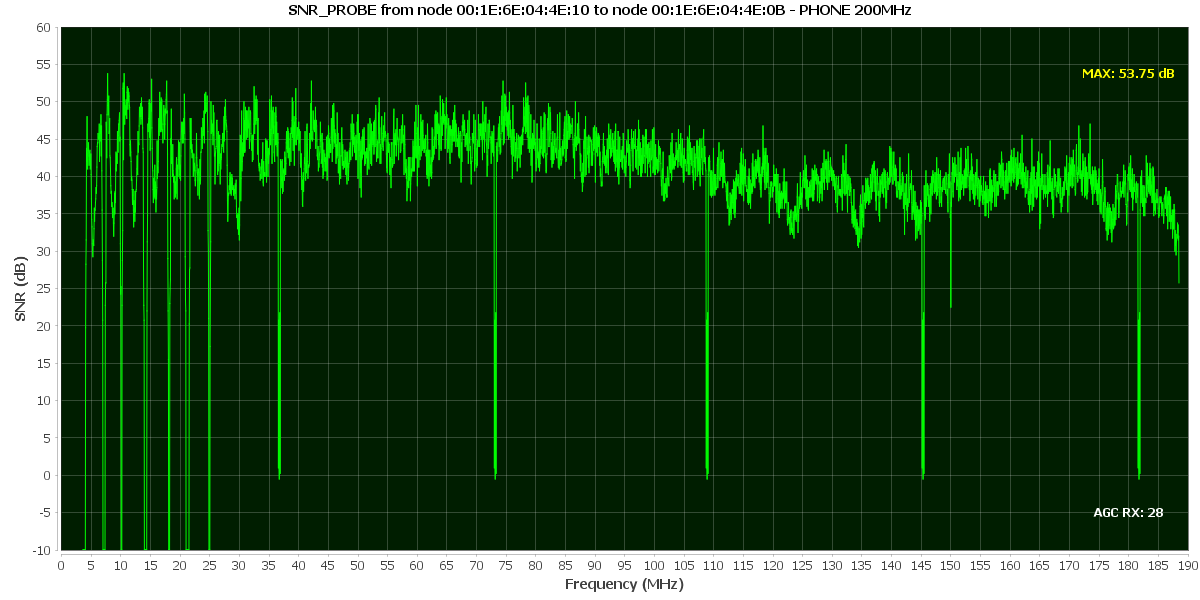
The alternatives being discussed ADSL/VDSL/G.hn actually detect the capability of the medium and adjust the transmission rates and frequency to give the maximum possible speed. IMO they are much more advanced technologically and much more interesting. (Ethernet is doing exactly 250 Mbps on one pair, G.hn can do up to 1700 Mbps on the same pair, automatically adjusted, the article is getting 1300 Mbps which is insane!)
Worthwhile to point out: The Cat5 cable required for gigabit Ethernet is merely twisted pairs with no insulation, which is pretty much a dumb basic cable (with 8 wires). That's why any cable can work in practice.
I don't know how possible it is to find a really bad cable (untwisted) and it might work on a short length anyway. (Your 1980s office cabling must have been 8 wires if you were able to get gigabit later, so it was far beyond basic phone wires or Cat1 from the time).
Sure, they will have been bundles of 4 pairs and I suppose we could say that is a matter of luck, it will have been installed from the outset in anticipation of networking - there's a period in the late 1980s when everybody is iterating on what will soon become 10baseT and the people in that building would have known all about it - but there's no reason back then to know 4 pairs will be an auspicious choice rather than 3 or 6.
So yes, those cables though they weren't Cat 5e because it didn't exist when they were manufactured, also were not basic phone cables, and I believe when the building was formally opened it had "ground breaking" 10Mbit Ethernet to every laboratory.
It's a setup seen in a lot of new builds flat from the 2000s and 2010s, which is a very large amount of the housing stock in London for flats (There has been so many constructions!).
It might have detected the wrong country/city for you. Check Settings -> Downloads -> Region
Otherwise it's just your WiFi being patchy. I think Steam is doing "friendly" bulk download, it slows down before the connection is saturated, to avoid disconnecting your wife/mum/siblings watching Youtube or on a videoconference.
> There are four pair of wires in the cable. If you use all of them for TX, you can't receive.
No, you absolutely can use them all for transmit and receive at the same time. The device at each end knows what signal it is transmitting, and can remove that from the received signal to identify what has been transmitted by the other end.
This is the magic that made 1000Base-T win out among the candidates for Gige over copper, since it required the lowest signaling frequencies and thus would run better over existing cables.
1000Base-T uses four pairs in both directions at the same time. It does this through the use of a hybrid in the PHY that subtracts what is being transmitted from what is received on the wires. 802.3ab is a fairly complicated specification with many layers of abstraction. I spent a few months studying it for a project about a decade ago.
  Autonegotiation is a requirement for 1000BASE-T implementations as minimally the clock source for the link has to be negotiated, as one endpoint must be master and the other endpoint must be slave.

  1000BASE-T uses four cable pairs for simultaneous transmission in both directions through the use of echo cancellation with adaptive equalization. Line coding is five-level pulse-amplitude modulation (PAM-5).

  Since autonegotiation takes place on only two pairs, if two 1000BASE-T interfaces are connected through a cable with only two pairs, the interfaces will complete negotiation and choose gigabit as the best common operating mode, but the link will never come up because all four pairs are required for data communications.

  Each 1000BASE-T network segment is recommended to be a maximum length of 100 meters and must use Category 5 cable or better.

  Automatic MDI/MDI-X configuration is specified as an optional feature in the standard that is commonly implemented. This feature makes it safe to incorrectly mix straight-through and crossover-cables, plus mix MDI and MDI-X devices.
> 1000Base-T uses two pairs per direction, actually. It's full duplex. Each port sees two TX and two RX pair.
you may be thinking of 1000Base-TX (TIA‐854) which uses 2 pairs in each direction, similar to 100Base-TX (IEEE 802.3u). whereas 1000Base-T (IEEE 802.3ab) uses all 4 pairs in both directions.
basically, the -TX are dual simplex with a set of wires for each direction and -T are full-duplex with the same wires used in both directions at the same time.


Yep, the scheduling has been a problem for a while. There was an amazing article few years ago about how the Linux kernel was accidentally hardcoded to 8 cores, you can probably google and find it.
IMO the most interesting problem right now is the cache, you get a cache miss every time a task is moving core. Problem, with thousands of threads switching between hundreds of cores every few milliseconds, we're dangerously approaching the point where all the time is spent trashing and reloading the CPU cache.